

You can maintain a shopping list in the Sentai app, by asking Sentai to add something onto the shopping list. The list can shared with family and friends as configured.
To add a shopping item from the speaker
Let Sentai know in conversation that something is needed and it will add it to the list.
To add a shopping item in the app
Press Shopping in the primary navigation of the app
Press Add item
Press the new item text field and enter your item. Don’t forget, if available, you can speed things up by using the mic button on your phone’s keyboard to convert your speech to text.
Press the enter button on your phone keyboard
To change the status of a shopping item
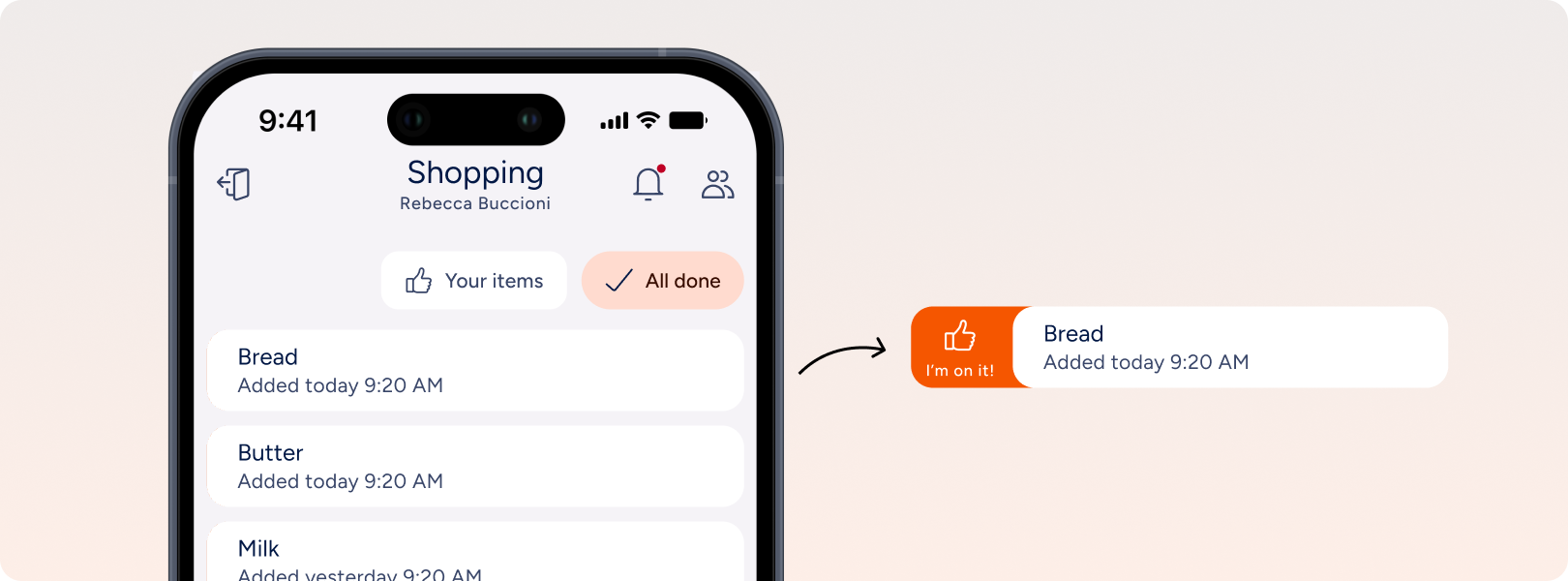
Carers and family members can change the status of a shopping item to let everyone know that it’s in progress or done.
Slide the item it to the right.
Tap “I’m on it!” and, once you’ve taken care of the item, “Done”, to let everyone know you have taken care of it.
To avoid making things too noisy, Sentai won’t sent a message to users, but users can query Sentai to find out who’s taking care of their shopping.
To delete a shopping item
Slide the item it to the left.
Tap Delete to remove the item from the list.